How to Measure PDF Area with Cutouts and Depth
Quick answer
To measure net PDF area in PolyPDF, calibrate the page and verify a known dimension. Trace a closed area, then use Add Cutout for openings wholly inside its boundary. For an exclusion touching the outer edge, trace the net outline around it instead; do not subtract the same opening twice. Review the area, units, and formula before exporting. A positive real-world Depth changes area to volume; hatch styling does not change the quantity.
Check the downloadable net-area example
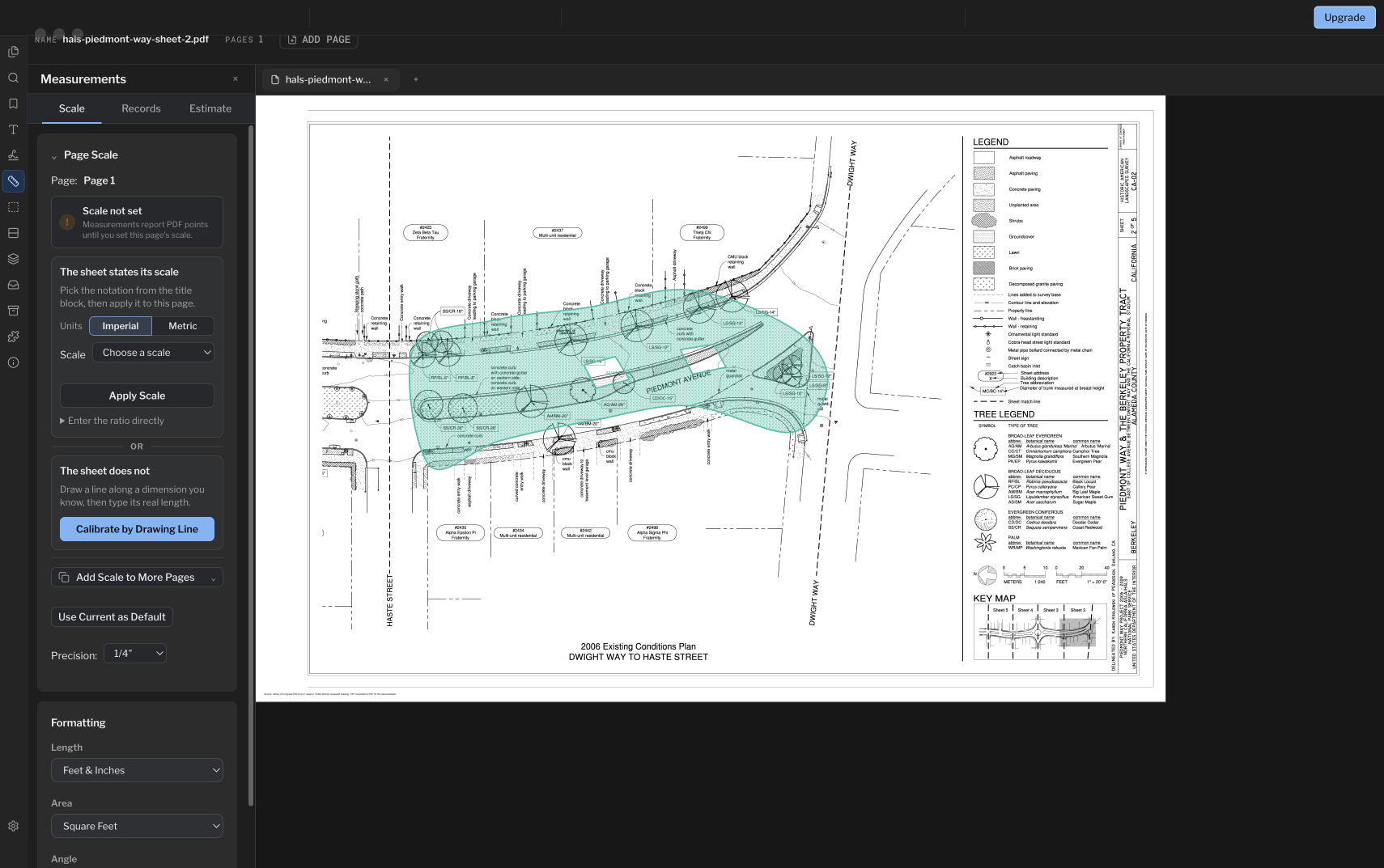
Net-area takeoff is more useful when the annotation records the outer boundary, each excluded opening, and any depth used for volume. PolyPDF 1.4.0 keeps those inputs on one selectable measurement.
- Release review
- Aligned with PolyPDF 1.5.4 (build 26) on . Earlier walkthroughs and screenshots retain their versions below.
- Walkthrough verified
- Tested with
- PolyPDF 1.5.0 (build 22); screenshots from 1.4.0 (build 17)
- Platforms
- macOS and Windows
Work with the construction drawing set
Take off finishes from the Willow Creek interiors plan
I101 · I501
- Open I101 and calibrate its 20 ft reference. Read the F1 and F2 finish key before measuring.
- Trace the dimension-boundary zones for tiled rooms 107 and 108 separately: 288 sq ft each, or 576 sq ft together.
- Compare F2 tile with 576 sq ft and F1 resilient flooring with 5,184 sq ft. Apply any waste allowance separately.
The authored finish schedule uses room dimension boundaries without wall-thickness deductions. These exercise areas are not net installed quantities; I501 details use different scales.
Drawing reference values, not new app test results. Work on a copy and check your own saved output.
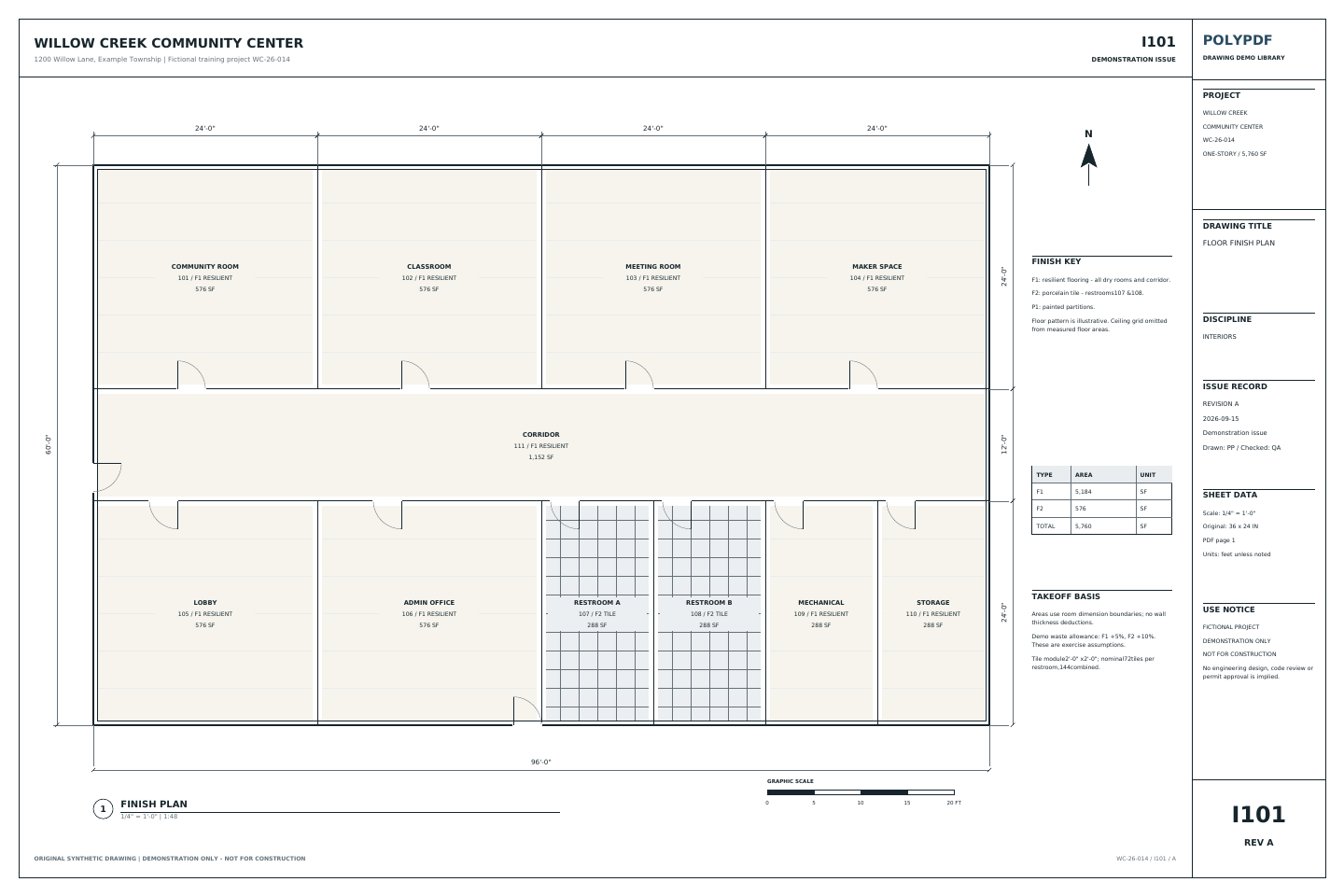 Download the example drawing · PDF
The exercise above uses the Willow Creek library. Earlier walkthrough screenshots and saved examples below retain their original drawings, versions, and quantities.
Check a net area against the drawing and its export
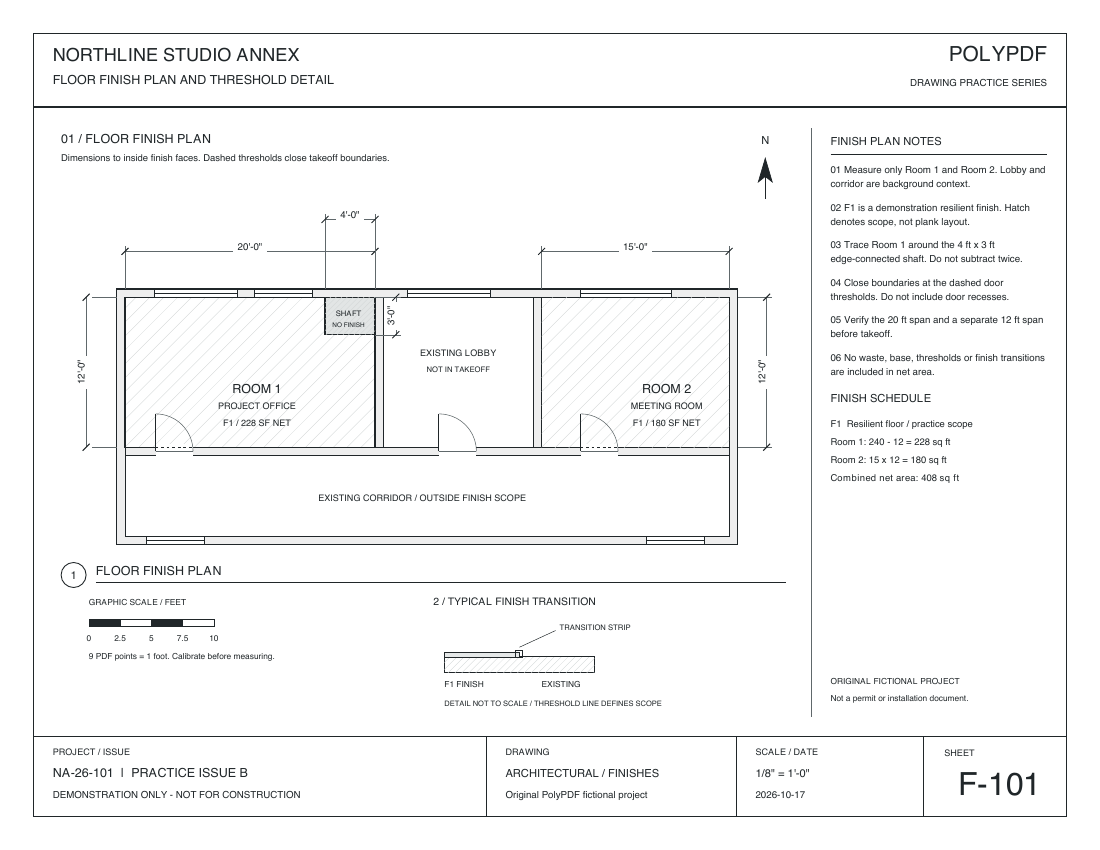
Use the separate F-101 flooring practice sheet: Room 1 is 20 ft × 12 ft with a 4 ft × 3 ft corner exclusion. Room 2 is 15 ft × 12 ft. The source uses 9 PDF points per foot; the historical screenshots in this guide use a different drawing.
Interior opening or edge-connected notch?
For an opening wholly inside an area, trace the outer boundary and add an interior cutout. If an exclusion touches the outer edge, trace the net outline around it. F-101 uses this second method: the corner exclusion is part of the outline, so do not also subtract it as a cutout.
Three measurements to review in Free
Calibrate along the printed 20 ft span, then use one manual length measurement to check the independent 12 ft height. If the check agrees with your required tolerance, trace Room 1 around the corner exclusion and trace Room 2 separately. That is one length check and two area measurements.
Need help setting and checking the scale? Use the separate calibration exercise first; do not assume two different exercises fit one three-measurement allowance.
| Area | Reference calculation | Net quantity |
|---|---|---|
| Room 1 | (20 × 12) − (4 × 3) | 228 sq ft |
| Room 2 | 15 × 12 | 180 sq ft |
| Combined net area | 228 + 180 | 408 sq ft |
The 228 sq ft result already excludes the 12 sq ft corner. Do not subtract it again. The reference CSV includes gross, deduction, subtotal, waste, and total rows for explanation; summing its entire quantity column is incorrect.
Inspect the saved Mac result
The practice drawings were redrawn on October 17, 2026 with walls, doors, dimensions, legends, and title blocks. The measured examples retain the original scale, geometry, and Mac-created annotations on the updated backgrounds. They are republished derivatives, not new desktop exports. The worksheet CSV and PDF totals come from the original October 16 test.
In this Mac worksheet CSV, Quantity 2 means two area records; Total 408 with Unit sq ft is the measured area. The formula is SUM(228 + 180). Compare the saved page, formula, unit, and total before using an export for pricing.
These existing outputs were saved, reopened, and checked in PolyPDF 1.6.6 build 38 on Mac. They verify the two net areas, not interior-cutout or volume behavior. The length-check-plus-two-areas sequence is guidance; the historical export contains only the two areas. No current-release or Windows test of this sequence has been completed. The synthetic drawing is for practice, not construction.
Keep net area, volume, and purchasing quantities separate. A real-world depth converts area to volume; a waste allowance changes the purchasing quantity. Apply a chosen flooring allowance after reviewing the net area →
Start with the drawing. Upgrade when the job needs more.
Free with no trial timer: markup, review, calibration, 3 hand-created measurements per document, and Revision Package viewing. Symbol Search, plugins, and Revision Package changes or publishing require Pro.
Free allows three hand-created measurements per document. Pro removes that cap for larger takeoffs. Review Pro pricing and license terms →
Move and resize area cutouts in 1.5.4
Select an area cutout and drag inside it to move the opening. Resize handles now align with the selection frame. Keep each cutout inside the intended boundary, avoid overlapping openings, and review the net area after making a change.
Arc controls also have separate roles: the middle handle changes radius, while end handles change sweep. Helper dimensions show radius for middle and corner adjustments, and arc length for sweep adjustments.
Metric dimensions in 1.5.1
In PolyPDF 1.5.1, new metric dimensions default to millimetres. Existing documents retain their explicit display formats, and metric area and volume remain in square and cubic metres. Changing the displayed unit does not establish the page scale: verify a known dimension after any scale or unit change.
Calibrate first, then define what “area” means
Set the scale for the exact page before tracing. Use a scale printed in the title block only when you know the PDF still has that plotted relationship; otherwise calibrate by drawing over a long, known dimension and verify a second span. PolyPDF stores the calibration per page, and an uncalibrated page reports square PDF points rather than pretending it knows real-world square feet or square metres.
Next decide the boundary convention. Gross floor area, finish area, slab area, roof membrane, paving, and paint coverage can use different faces and exclusions even on the same plan. Put that meaning in the Subject and project notes. Software can calculate the geometry you trace, but it cannot decide which side of a wall belongs in your scope.
- Use a long calibration reference and snapped endpoints where the PDF contains vector linework.
- Check a second known dimension before tracing a large or commercially significant area.
- Create a Scale Region when a detail on the page uses a different scale from the main view.
- State whether the boundary is gross, net, centerline, inside face, outside face, or another project convention.
Trace and close the outer boundary
- Choose the Area measurement tool.
- Click each meaningful turn around the outer boundary. Zoom in for short offsets and crowded corners.
- Close the figure at the starting point after at least three vertices.
- Select the completed area and inspect its handles against the intended boundary.
- Set the Subject and Status so the Takeoff Worksheet explains what the quantity represents.
- If the real boundary is intentionally curved, choose the Curved path option and verify the displayed curve follows it.
For a straight path, the area follows the polygon formed by the vertices. When the area path is set to Curved, PolyPDF 1.4.0 uses the displayed smoothed boundary in its area calculation rather than measuring only the straight chords between control points. Use the mode that matches the actual edge, not the one that merely looks cleaner.
Avoid self-intersecting boundaries and unnecessary points. A clean outline is easier to audit and less likely to hide a misplaced segment.
Subtract one or more interior cutouts
With the area selected, find Area Cutouts in the style controls and choose Add Cutout. Trace the first opening as a closed polygon. PolyPDF checks each cutout vertex against the stored straight outer control polygon and warns when a vertex falls outside it. That check does not prove that every connecting edge stays inside a concave outline, and a curved visible boundary can differ from the stored control polygon, so inspect the entire cutout at high zoom. Repeat Add Cutout for additional voids. The selected annotation shows the number of stored cutouts, and Remove Last removes the most recently added one.
net area = outer boundary area − Σ(each cutout area)
- Use cutouts for actual exclusions such as shafts, courtyards, large penetrations, or openings required by your scope.
- Keep cutouts wholly inside the outer boundary and inspect them at high zoom before accepting the total.
- Do not overlap cutouts. PolyPDF subtracts each stored polygon; overlapping rings can subtract the shared portion more than once.
- Do not use a cutout as a visual mask for an uncertain scope item. Record the decision and its basis.
Worked net-area example
The example above uses one curved outer boundary and two closed cutouts. The Records panel shows a net result of 28,793.49 sq ft, with both openings already subtracted. Your own totals depend on the drawing you start from, the scale you set for that page, and the boundary you decide to trace.
| Geometry | Calculation | Quantity |
|---|---|---|
| Outer boundary | Curved path | Included in the net-area calculation |
| Cutout 1 | Closed polygon | Subtracted from the outer area |
| Cutout 2 | Closed polygon | Subtracted from the outer area |
| Displayed net area | Outer curved area − both cutouts | 28,793.49 sq ft |
curved outer area − cutout 1 − cutout 2 = 28,793.49 sq ft net
Review the annotated page as well as the total. A correct formula cannot detect that an opening was traced twice, that the wrong stair was excluded, or that the outer boundary followed the wrong face of wall.
Add depth only when volume is the intended quantity
A selected area measurement exposes a Depth field. Enter a positive real-world length in the current measurement format—for example, 4 inches, 100 millimetres, or 1 foot 6 inches. Confirm the active input unit before typing a bare number. PolyPDF multiplies the net area by that depth and changes the worksheet quantity kind from Area to Volume. Clear the field to return to an area quantity.
volume = (outer area − cutout areas) × depth
Depth is a typed uniform value, not a third dimension detected from the drawing. Do not use one depth where the assembly varies without a documented averaging method. If multiple zones have different thicknesses, create separate area measurements so each volume has an explicit boundary, Subject, and depth.
PolyPDF requires a real-world page or region scale before accepting depth. That prevents an entered depth from being combined with an uncalibrated area to produce a misleading volume.
Hatch scale is visual, not mathematical
The Hatch controls set the pattern, colour, opacity, and scale used to draw the annotation. Increasing hatch scale changes the spacing or size of the pattern; it does not change the outer geometry, the cutouts, the net area, or the depth. The example above uses a diagonal crosshatch at 110 percent so the two cutouts stay easy to see.
| Control or edit | Changes quantity? | What it changes |
|---|---|---|
| Move a boundary vertex | Yes | Outer area geometry |
| Add or remove a cutout | Yes | Net area geometry |
| Switch Straight / Curved path | Yes | Measured boundary shape |
| Enter or clear Depth | Yes | Area versus volume and the resulting value |
| Change hatch scale, colour, or opacity | No | Annotation appearance only |
| Change displayed precision | No | Rounding and label presentation only |
Use a hatch that makes the included region and excluded openings easy to inspect at the zoom and print size reviewers will use. A decorative pattern should never obscure the very boundary it is meant to explain.
Limits worth knowing before you rely on a total
- Calibration converts PDF geometry; it cannot repair nonuniform scan distortion, perspective, or a warped original.
- A net-area total is only as defensible as its source revision, boundary convention, scale verification, and cutout review.
- CSV or PDF export preserves the calculated records, not the reasoning behind an undocumented scope decision.
- The free edition allows up to three hand-created measurements per document. Symbol Search is a separate PolyPDF Pro workflow in the current release.
A measurement is only as accurate as the drawing it is traced on, the calibration set for that page, and the boundary you chose. PolyPDF calculates the geometry you give it; deciding what belongs inside the boundary stays with you.
Frequently asked questions
How do I exclude a notch that touches the outer boundary?
Trace the net area outline around an edge-connected exclusion. Reserve Add Cutout for openings wholly inside the boundary. In the F-101 practice sheet, the 4 ft by 3 ft corner exclusion is already omitted from the 228 sq ft Room 1 outline; do not subtract it again.
Can I add more than one cutout to a PDF area measurement?
Yes. PolyPDF 1.4.0 stores multiple cutout polygons on one area measurement and subtracts each from the outer area.
What does Depth do to an area measurement?
A positive real-world Depth multiplies the net area and changes the result to volume. Clear Depth to return to area.
Does changing hatch scale change measured area?
No. Hatch pattern, colour, opacity, and scale change only the annotation’s appearance. Boundary vertices, cutouts, path shape, calibration, and depth drive the quantity.
Does PolyPDF guarantee a cutout stays inside the visible outer area?
No. PolyPDF checks each traced vertex against the stored straight control polygon, but it does not prove every connecting edge stays inside a concave outline, and that polygon can differ from a curved visible boundary. Keep the complete ring visibly inside and inspect it at high zoom.
Can I use different depths inside one area?
One area measurement has one uniform Depth. For zones with different thicknesses, create separate areas so each boundary and depth is explicit.
Sources and further reading
- PolyPDF: Measure PDF on Mac
- PolyPDF: PDF takeoff software
- Library of Congress item ca3441: Piedmont Way & the Berkeley Property Tract, East of College Avenue between Dwight Way & U.C. Memorial Stadium, Berkeley, Alameda County, CA — Historic American Landscapes Survey HALS CA-2, the collection record for the drawing used in this guide.
- Library of Congress HALS CA-2 sheet 2: “2. 2006 Existing Conditions Plan, Dwight Way to Haste Street” — PGAdesign, measured drawing, Historic American Landscapes Survey, National Park Service, U.S. Department of the Interior, 2006; Prints and Photographs Division, Library of Congress; HALS CA-2, sheet 2 of 5. This is the sheet shown beneath the example measurements.
- Library of Congress: HABS, HAER, and HALS rights and restrictions — Library of Congress guidance and the credit format used for this drawing collection.
Test a net-area workflow on your own PDF
Download PolyPDF for macOS or Windows, set the scale on one page, and use the free edition’s measurement allowance to trace a real boundary and its openings before deciding whether to unlock unlimited measurements.
Free with no trial timer: markup, review, calibration, 3 hand-created measurements per document, and Revision Package viewing. Symbol Search, plugins, and Revision Package changes or publishing require Pro.