Calibrated PDF measurement · Mac and Windows
Measure distances, areas, and quantities in PDF drawings.
Set a verified scale, measure the drawing, and keep the results beside the PDF. PolyPDF is a desktop measuring tool for construction plans on Mac and Windows.
Install the desktop app to work with your drawings. Free includes calibration and up to 3 hand-created measurements per document.
Free with no trial timer: markup, review, calibration, 3 hand-created measurements per document, and Revision Package viewing. Symbol Search, plugins, and Revision Package changes or publishing require Pro.
Quick answer
How do you measure a scaled PDF drawing?
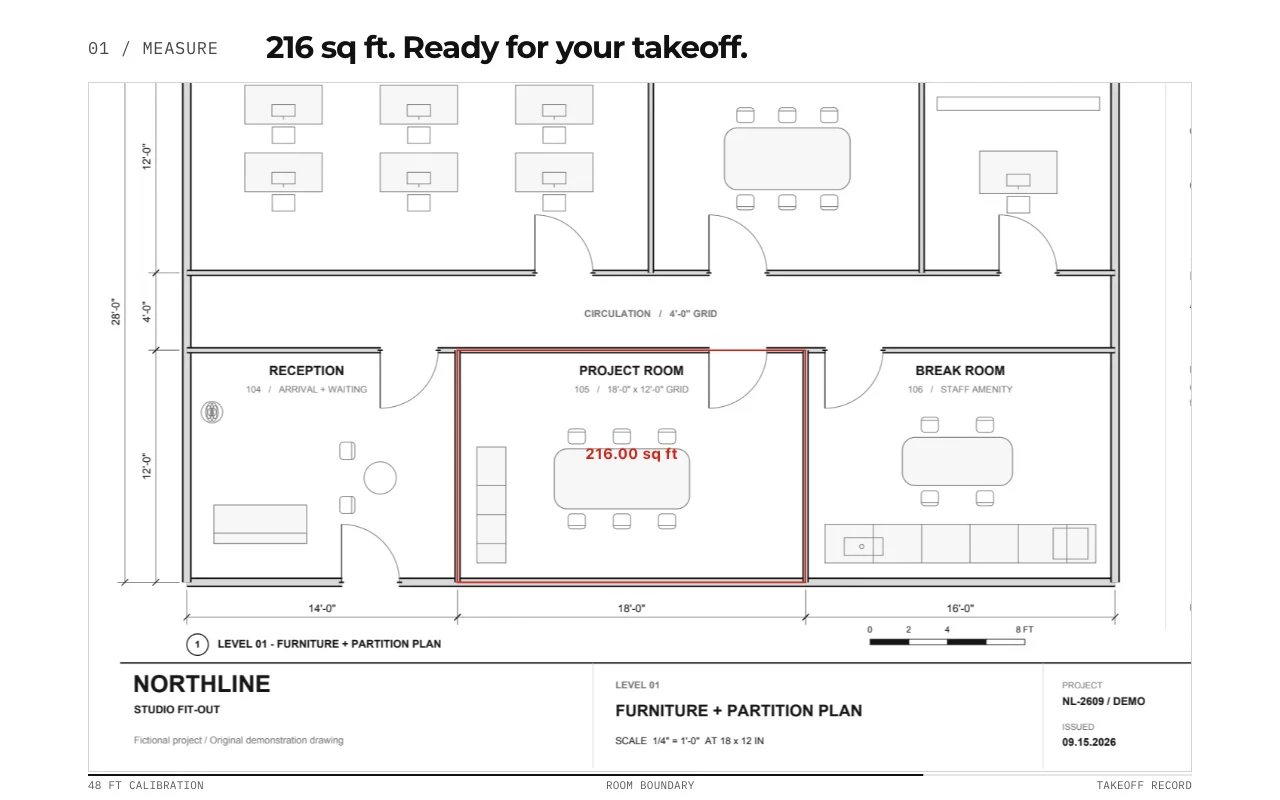
Open the PDF in a measuring tool, calibrate against a known dimension, and verify a second span before measuring. In PolyPDF, trace distances or area boundaries and review the units and quantities in the takeoff worksheet. Check each page or detail with a different scale separately. A single calibration cannot correct a scan that is stretched differently in two directions.
Check your reference measurements →01 / WHY
A useful measurement starts with a scale you can verify.
PDF page size is not the building size. Calibrate against a known dimension, then test a different labeled span before relying on area or distance results. Repeat this check for each page or drawing region with a different scale.
From drawing to quantity
Try a complete, reviewable example.
Start with a drawing, verify its scale, inspect the quantities, and save a separate review copy. Keep the source revision and units with every exported result.
The Northline review sample was saved and reopened in PolyPDF 1.6.6 build 38 on Mac. It verifies one rectangle and one text note, not every PDF annotation or recipient application.
Follow the takeoff walkthrough →Drawing and handoff files
Free downloads. No account or email required. Synthetic drawings are for practice, not construction.
02 / WORKFLOW
From source PDF to a result you can review.
- 01
Open the correct revision
Confirm sheet number, revision, and units before measuring. Keep the original PDF as the source record.
- 02
Calibrate a known distance
Use a printed dimension or a verified architectural or engineering scale. Check an independent span in the other direction.
- 03
Measure the scope
Trace distances, boundaries, and exclusions. For scanned plans, inspect line thickness and distortion; one scale cannot correct unequal stretch.
- 04
Review and export
Check subjects, units, pages, and totals. Export the takeoff worksheet to CSV or PDF for downstream review.
03 / FIT
Useful takeoff fundamentals without a recurring seat fee.
- Works with ordinary PDF plan sets from designers, owners, and general contractors.
- Supports architectural and engineering scale calibration in imperial or metric units.
- Keeps measurements visible on the sheet and organized in the takeoff worksheet.
- Exports results without requiring a CAD source file.
- Lets you verify the workflow free before unlocking unlimited hand-created measurements.
Start with the free app. Pay once to unlock every Pro workflow.
Use PolyPDF 1.x forever on up to 3 Mac or Windows computers. Every PolyPDF 1.x update is included. Future major versions may be optional paid upgrades.
14-day money-back guarantee. Try PolyPDF on your own drawings, risk-free.
04 / FAQ
Questions before you test it.
Can I measure a PDF without CAD?
Yes. Use a known dimension to calibrate the PDF. Accuracy still depends on the source drawing, calibration, and the endpoints and boundaries you choose.
Does this run in my browser?
PolyPDF is a downloadable desktop application for Mac and Windows. The website calculator works in a browser, but PDF measurement takes place in the app.
What about multiple scales?
Verify each page and scaled detail separately. Do not reuse a page scale for an enlarged detail without checking its geometry.
Can I measure scanned plans?
You can measure visible drawing geometry after calibration. Check references in both directions; scanning distortion and line thickness can limit the result.