How to Calibrate a PDF Drawing Scale
Quick answer
To calibrate a PDF drawing, open the page in PolyPDF, choose Measurements › Scale, and either apply the scale notation printed on the sheet or choose Calibrate by Drawing Line. For line calibration, snap the two endpoints to a known span, enter its real-world length, and then measure a different labeled span. Do not begin takeoff until that second value agrees within the tolerance your work requires.
Try the downloadable calibration exercise
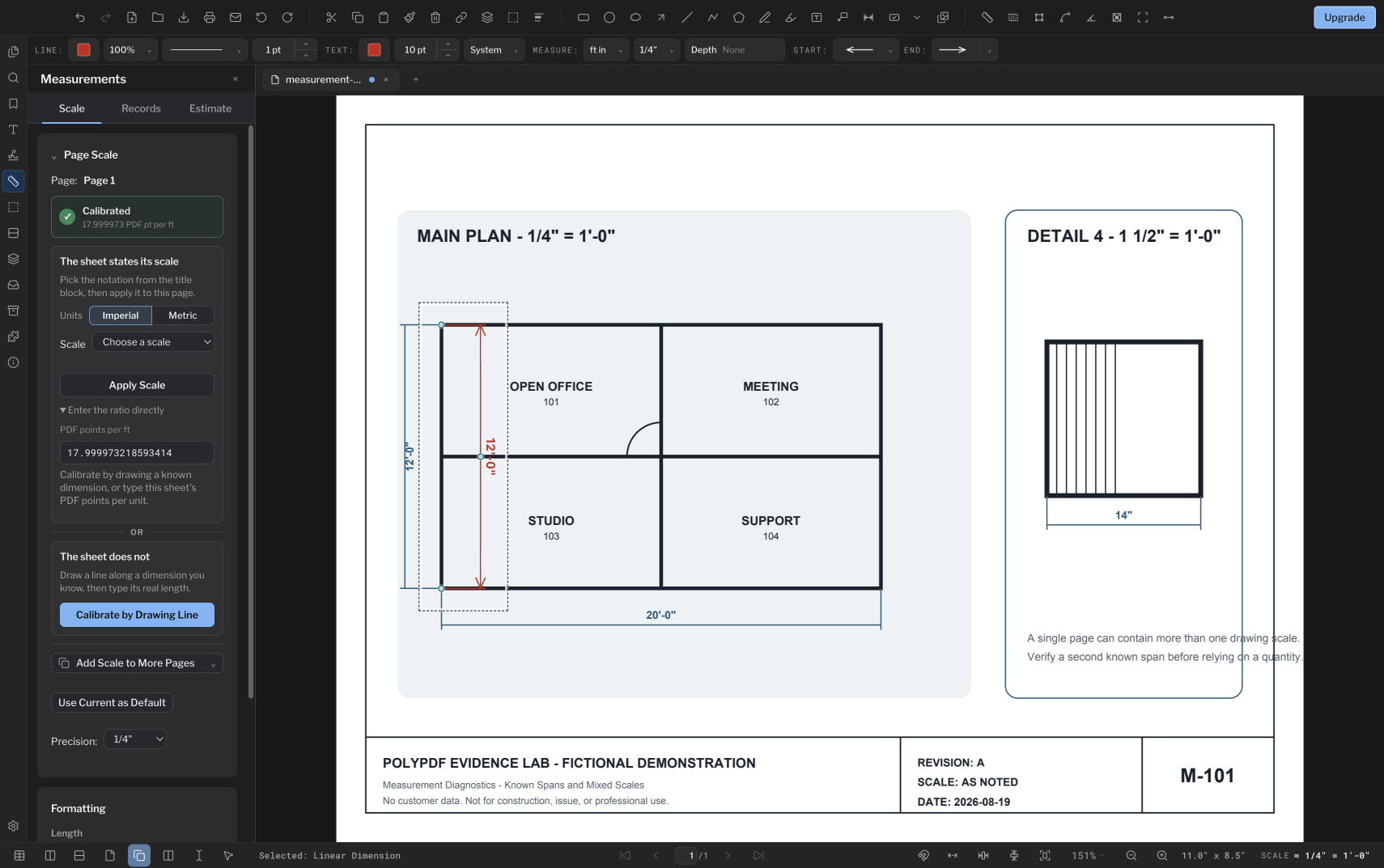
A trustworthy takeoff starts with one page-specific scale and an independent check. PolyPDF lets you apply the scale printed in a title block or draw over a known dimension when the sheet does not state one.
- Release review
- Aligned with PolyPDF 1.5.1 (build 23) on . Earlier walkthroughs and screenshots retain their versions below.
- Walkthrough verified
- Tested with
- PolyPDF 1.5.0 (build 22); screenshots from 1.4.0 (build 17)
- Platforms
- macOS and Windows
Work with the construction drawing set
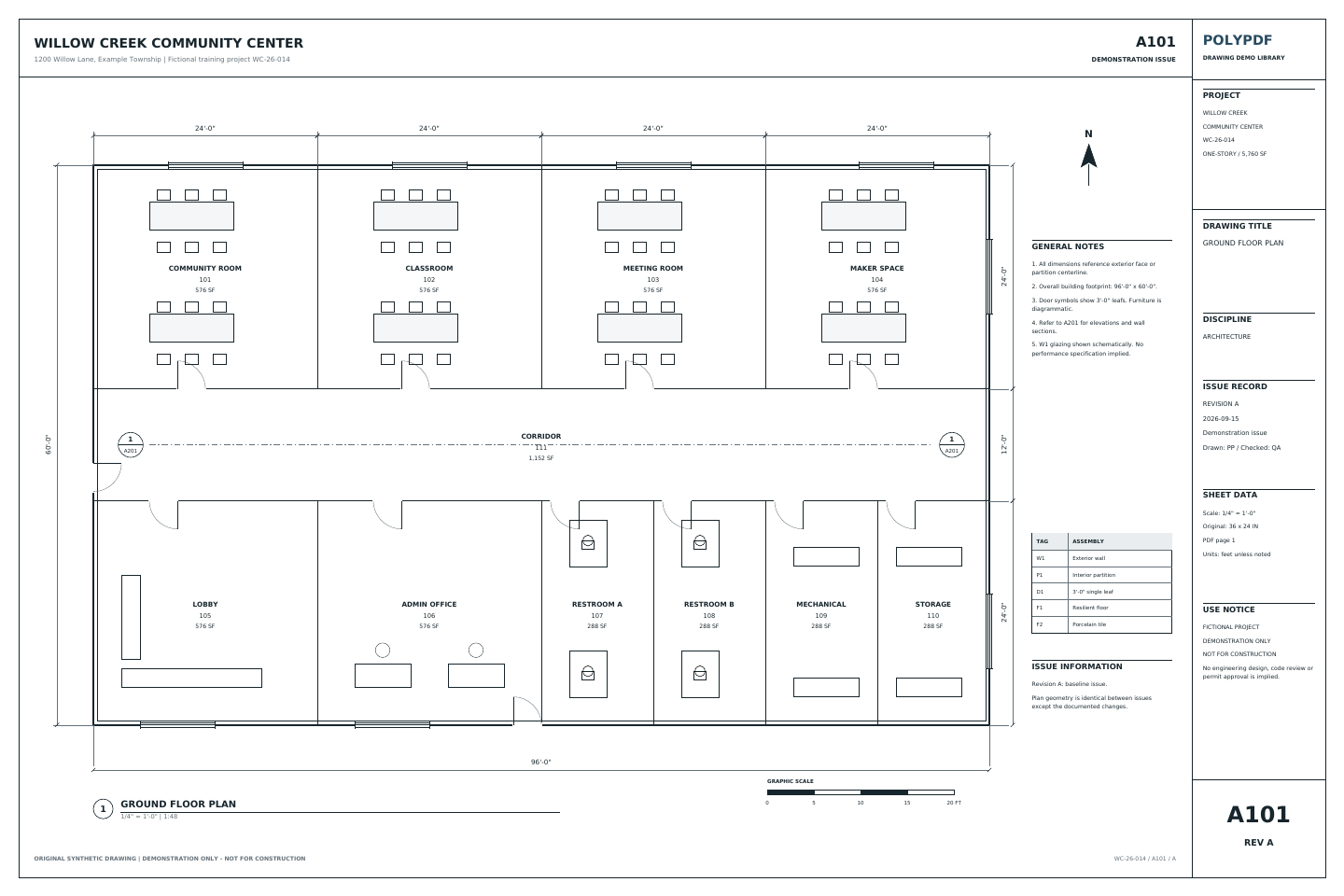
Measure the Willow Creek architectural plan
A101 · A201
- Open A101, Revision A. Calibrate the printed 20 ft reference; it spans 360 PDF points.
- Check the independent 96 ft width and 60 ft depth, then trace the outside building boundary.
- Compare the gross area with 5,760 sq ft. Keep sheet, revision, subject, unit, and total with the exported record.
This is a gross footprint exercise. It does not measure net flooring or subtract walls. The two length checks and one area use three manual measurements.
Drawing reference values, not new app test results. Work on a copy and check your own saved output.
Inspect the saved Mac example and its tested local build →
Move checked quantities into the free Excel takeoff template →
 Download Revision A · PDF
The exercise above uses the Willow Creek library. Earlier walkthrough screenshots and saved examples below retain their original drawings, versions, and quantities.
Practice PDF calibration with a drawing you can check
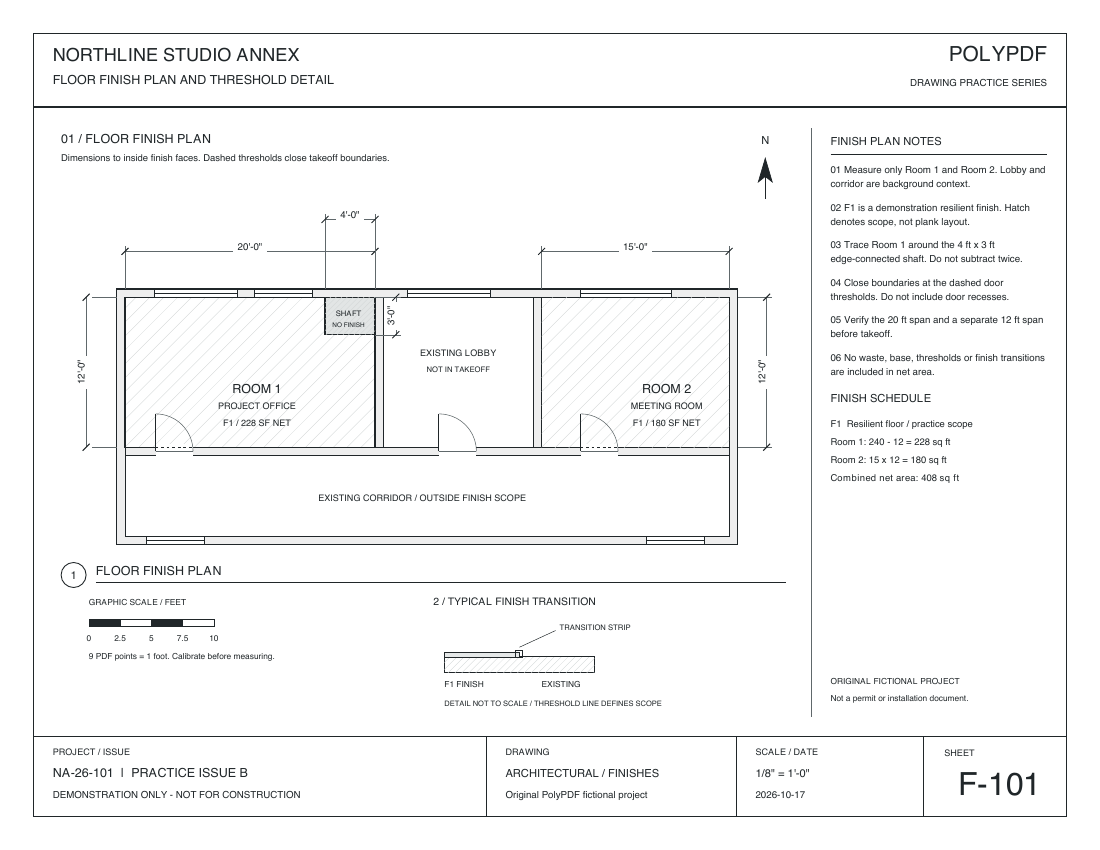
Use F-101, Revision A, a separate synthetic flooring sheet at 1/8 inch = 1 foot. Calibrate from its 20 ft span, check independent 15 ft and 12 ft spans, then trace one net area. This exercise fits the Free allowance of three hand-created measurements.
This download uses 9 PDF points per foot. The older screenshots in this guide use a different drawing at 18 PDF points per foot. Use the scale and dimensions of the file you actually open.
No account or email is required for these files.
Set the scale, then check two independent directions
Calibrate along Room 1’s printed 20 ft width: 180 PDF points ÷ 20 ft = 9 PDF points per foot. Calibration sets the scale; the following three rows are the manual measurements.
| Measurement | Reference | Expected |
|---|---|---|
| 1. Horizontal check | Room 2 width | 15 ft |
| 2. Vertical check | Room 1 height | 12 ft |
| 3. Net area | Room 1, excluding the shaft | 228 sq ft |
Compare both span readings with your project’s tolerance before tracing the area. If they disagree, recheck the endpoints, units, and calibration. Do not average the errors into one scale.
Check your two reference errors. Enter your own readings and tolerance; the checker compares numbers and does not measure or certify a PDF.
For the third measurement, trace Room 1 around its edge-connected 4 ft × 3 ft exclusion: (20 × 12) − (4 × 3) = 228 sq ft. Keep the two length checks separate from the area total, then save a copy and reopen it.
The practice drawings were redrawn on October 17, 2026 with walls, doors, dimensions, legends, and title blocks. The measured examples retain the original scale, geometry, and Mac-created annotations on the updated backgrounds. They are republished derivatives, not new desktop exports. The worksheet CSV and PDF totals come from the original October 16 test.
Reference dimensions come from the source geometry. Existing Mac outputs verify Room 1 at 228 sq ft and Room 2 at 180 sq ft in PolyPDF 1.6.6 build 38. This three-measurement exercise is guidance, not a new app test; current-release and Windows parity remain unverified.
See the full 408 sq ft takeoff and saved Mac outputs.
Try it on your Mac or Windows PC
Free with no trial timer: markup, review, calibration, 3 hand-created measurements per document, and Revision Package viewing. Symbol Search, plugins, and Revision Package changes or publishing require Pro.
Need more than three hand-created measurements on a document? Compare Free and Pro for takeoff.
Metric dimensions in 1.5.1
In PolyPDF 1.5.1, new metric dimensions default to millimetres. Existing documents retain their explicit display formats, and metric area and volume remain in square and cubic metres. Changing the displayed unit does not establish the page scale: verify a known dimension after any scale or unit change.
Pick the right calibration path
If the title block clearly states a scale and the PDF has not been resized, use the matching architectural, engineering, or metric preset. If the scale is missing, the sheet may have been scanned, or you cannot establish that the file still matches the plotted size, calibrate from a dimension you can verify instead. A drawn calibration uses the geometry actually present in this PDF, which is why it is the safer path for an uncertain file.
- Prefer a long, straight reference dimension. The same endpoint error is a smaller percentage of a long span than of a short one.
- Use a dimension whose value is explicitly printed on the drawing. Do not infer it from a door, grid, or object that only appears standard.
- Zoom in and enable Snap to Content when the reference endpoints coincide with vector linework. PolyPDF reports when one or both calibration endpoints were not snapped.
- Calibrate the page you are actually measuring. PolyPDF stores page calibration per page rather than assuming every sheet in a set shares one scale.
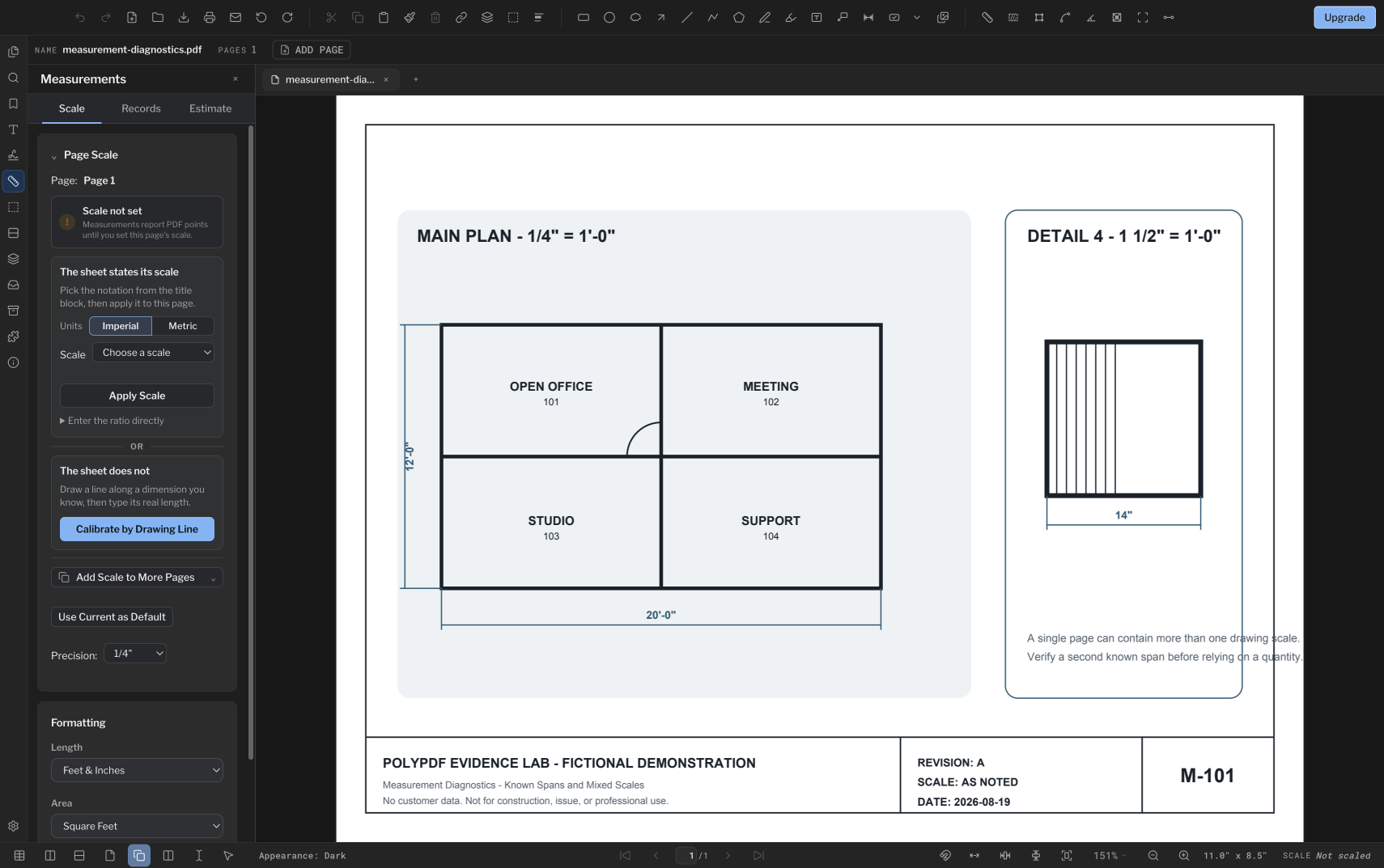
Calibrate from a known line, step by step
- Open the PDF and navigate to the page you intend to measure.
- Open the Measurements panel, choose the Scale view, and confirm the page number shown in the Page Scale card.
- Under “The sheet does not,” choose Calibrate by Drawing Line.
- Click or drag from the first known endpoint to the second. Use a horizontal or vertical span when possible because its endpoints are usually easier to identify.
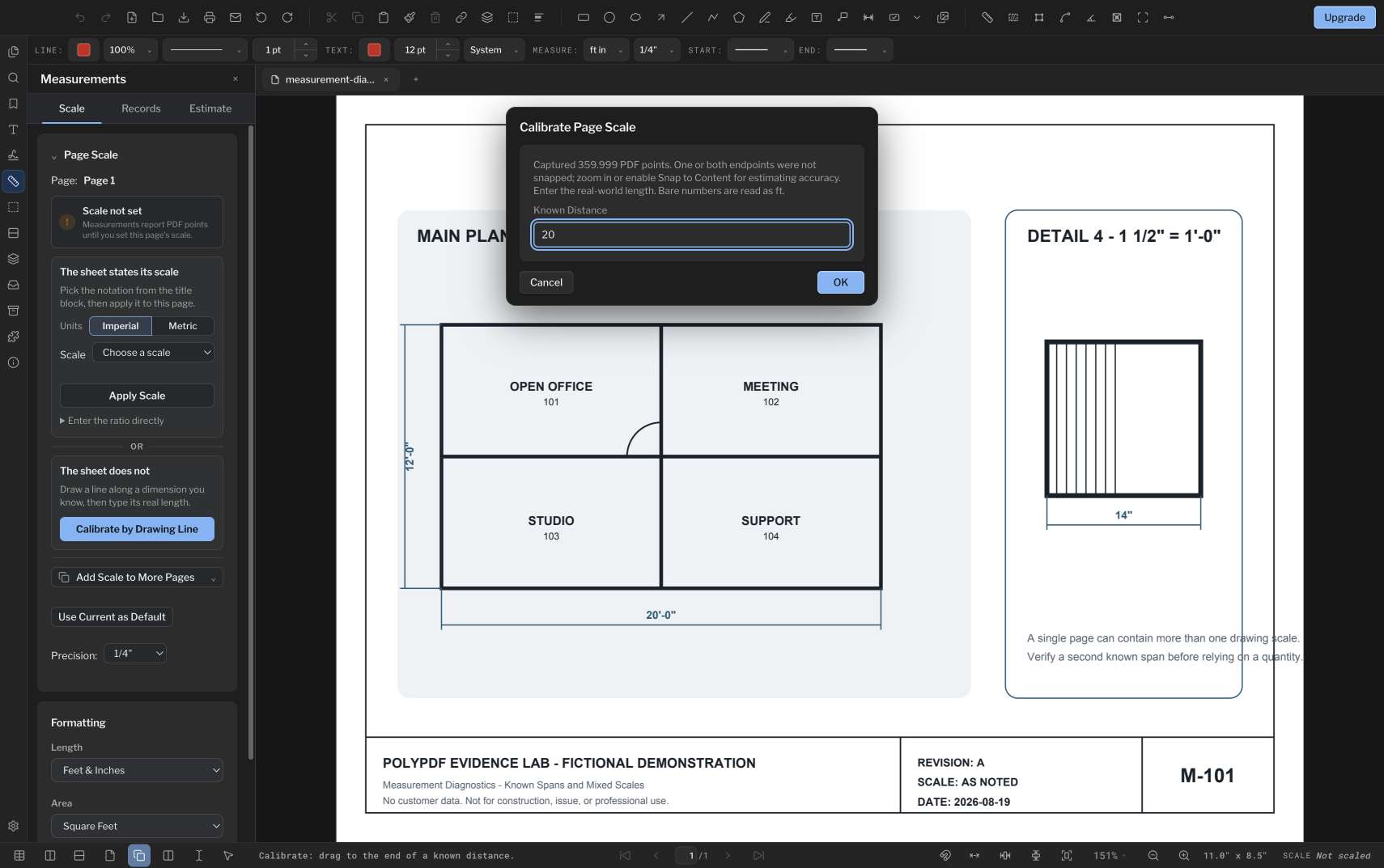
- In Calibrate Page Scale, enter the real-world Known Distance. With the feet-and-inches format active, the bare value 20 is read as 20 feet.
- Confirm the card says Calibrated and shows the captured ratio in PDF points per base unit.
- Switch to a length measurement tool and measure a second labeled dimension that was not used for calibration.
A green “Calibrated” state means a scale was saved. It does not mean the line or the typed distance was right, which is why the second known dimension matters.
Worked calibration: 20 feet across 360 points
The sample sheet prints a 20′-0″ horizontal dimension on the main plan. Snapping to its two endpoints captures exactly 360 PDF points. Entering 20 feet makes the page conversion explicit rather than assuming the printed 1/4-inch scale survived export or scanning.
360 PDF pt ÷ 20 ft = 18 PDF pt per ft
That independent vertical measurement reads exactly 12′-0″, matching the printed dimension on the sheet. On your own drawings, run the same check on a second labeled span and stop to investigate when the result falls outside the tolerance your takeoff requires. Accuracy depends on the drawing itself, the calibration you set, and where you place each endpoint.
Verify before you take off quantities
| Check | What you want to see | If it fails |
|---|---|---|
| Second known span | A value within your project tolerance | Recheck endpoints, units, and the typed distance |
| Current page | The intended sheet number in the Scale view | Calibrate this page or copy a proven scale only to identical-scale pages |
| Units | Feet/inches or metric matching the source drawing | Switch format and confirm the stored scale still represents the intended base unit |
| Detail or blowup | A reading that follows the detail’s own printed scale | Create a Scale Region for the differently scaled detail |
| Scan geometry | Agreement in more than one direction and area of the sheet | Treat the scan as distorted if one calibration cannot satisfy those checks |
For a multi-page set, “Add Scale to More Pages” copies the current calibration to the page range you choose. Use that convenience only when those pages genuinely share the same scale. A cover sheet, enlarged plan, or detail page can differ even when it is bundled into the same PDF.
When one page contains a detail or blowup at a different scale, PolyPDF’s Scale Regions panel can define a separate scale inside that outline. A measurement created there keeps a snapshot of the region scale it used, so later edits do not silently restate a recorded quantity.
What calibration can and cannot correct
One calibration produces one proportional conversion for the page or region. It can correct a uniformly resized PDF because every length changed by the same factor. It cannot repair nonuniform scan distortion, a photographed page with perspective, a warped original, or different portions of a sheet stretched by different amounts.
- Check a second span far from the calibration line, and check both horizontal and vertical references when the file is a scan.
- If one direction agrees and the other does not, do not average the error into a single scale. Obtain a better source or limit the work to a documented local region and state the limitation.
- Do not use the displayed zoom percentage as drawing scale. Zoom changes the on-screen size, not the PDF-space geometry used by measurement.
- Do not mix values from calibrated and uncalibrated pages. In PolyPDF 1.4.0, an uncalibrated page reports physical PDF points or square points rather than inventing a real-world scale.
A repeatable pre-takeoff checklist
- Confirm the page and revision.
- Choose the stated-scale preset or draw a known calibration line.
- Verify the saved units and page-scale status.
- Measure a different known span.
- Check a second direction if the source is scanned.
- Create scale regions for differently scaled details.
- Only then trace lengths, areas, perimeters, or counts and export the worksheet.
The free edition includes calibration and up to three hand-created measurements per document. Symbol Search is a separate PolyPDF Pro workflow in the current release.
Frequently asked questions
Can I set one PDF scale for every page?
You can copy a proven calibration to selected pages with Add Scale to More Pages, but PolyPDF stores scale per page. Copy it only when those sheets genuinely use the same scale.
Why should I measure a second known dimension?
The second span catches a misplaced endpoint, an incorrect typed value, the wrong units, or distortion that a single calibration line cannot reveal.
Can calibration fix a stretched or skewed scan?
Only uniform resizing can be corrected with one proportional scale. Nonuniform stretch, perspective, or local warping needs a better source file or a clearly limited local workflow.
Does zoom affect the measurement result?
No. Zoom changes how large the page looks on screen; PolyPDF calculates from PDF-space geometry and the saved page or scale-region calibration.
Sources and further reading
Verify the scale on your own drawing
Calibrate your own drawing before you commit to a takeoff
PolyPDF runs on macOS and Windows. Calibration is included in the free edition, so you can set the scale on your own page and check its second reference dimension first.
Free with no trial timer: markup, review, calibration, 3 hand-created measurements per document, and Revision Package viewing. Symbol Search, plugins, and Revision Package changes or publishing require Pro.