A Bluebeam alternative for Mac
A Bluebeam alternative for PDF takeoff on Mac.
Calibrate drawings, take off quantities, review markups, and compare revisions in a desktop app for Mac and Windows.
Try your own PDFs free. PolyPDF Pro is one payment for up to 3 computers. Before switching, check the PDF handoff and collaboration features your team needs.
Free with no trial timer: markup, review, calibration, 3 hand-created measurements per document, and Revision Package viewing. Symbol Search, plugins, and Revision Package changes or publishing require Pro.
01 / WHY
Choose by the work you need to carry forward.
A useful Bluebeam alternative needs to fit the drawings, quantities, and review process you already use. Check local measurement, PDF markup, exports, and collaboration separately, then test a representative file with the people who receive it.
MAC OPTIONS
What changes when you choose PolyPDF?
Bluebeam is available on Mac through several documented routes. Choose the one that fits your project’s required tools.
| Your workflow | PolyPDF | Bluebeam’s documented Mac options |
|---|---|---|
| Desktop measurement and takeoff | Runs directly on macOS. Calibrate the drawing, measure quantities, and review the takeoff worksheet. | Bluebeam points to Revu in a Windows virtual machine for the full desktop takeoff toolset. |
| PDF markup and review | Local callouts, notes, highlights, shapes, stamps, and drawing review on Mac and Windows. | Web access and the iOS app support review and markups. The iOS app can run on supported Apple Silicon Macs. |
| Worksheet handoff | Export quantity records to CSV or a PDF summary. Check units, subjects, and totals before sharing. | For a Revu-standardized estimating process, evaluate its desktop toolset through Windows virtualization. |
| Project collaboration | PolyPDF has its own company-hosted collaboration. It does not connect to Bluebeam Studio. | Keep a supported Bluebeam option when your project requires Studio Projects or Sessions. |
| Licensing | Free evaluation with clear limits. Personal Pro is one payment for PolyPDF 1.x on up to 3 computers. | Check Bluebeam’s current subscription plans and the features included in your chosen access route. |
Reviewed October 15, 2026. Sources: Bluebeam’s Mac guidance, Bluebeam Download Center, and PolyPDF’s current personal license. This comparison is published by PolyPDF; Bluebeam is a separate product and company.
TRY THE HANDOFF
Start with a sample. Finish with your own file.
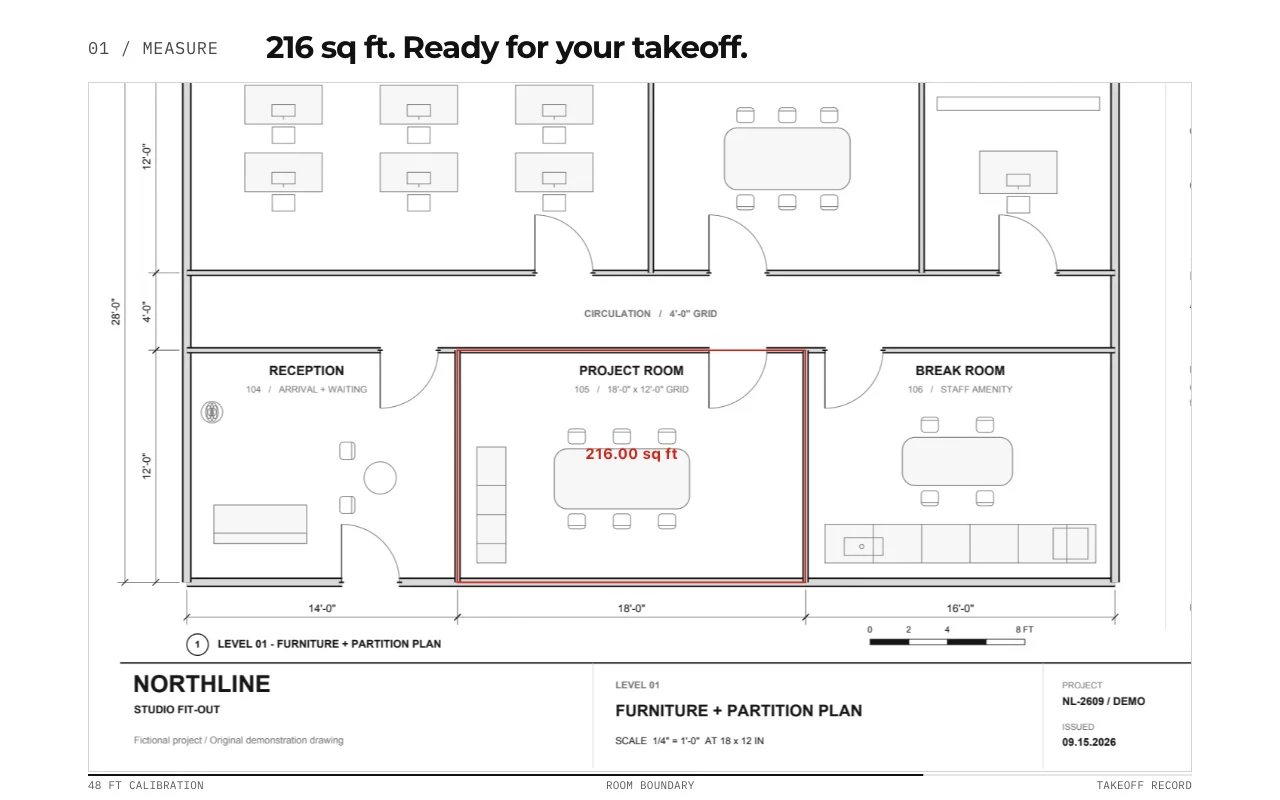
The demo above uses our fictional Northline Studio drawing. Download the same source PDF, add a note and a measurement, then save a separate copy and check it in the viewer your team uses.
Download the sample drawing PDFWe added a review box and a text note in PolyPDF 1.6.6 (build 38), saved the PDF, closed it, and reopened it. The saved annotations also rendered in an independent PDF viewer engine. Checked October 15, 2026.
Download the saved review PDFThe sample is a demonstration drawing, not for construction. A successful sample check does not establish compatibility for every PDF, markup, signature, form, or Studio workflow.
Use the Bluebeam migration checklist and blank CSV worksheet to record your own scale, quantity, markup and recipient checks before switching.
For a complete quantity example, follow the worked takeoff guide. It shows the source scale, a 540 sq ft area, a 30 ft run, and 12 reviewed counts. Those quantities belong to that guide’s sample, not the Northline drawing above.
02 / WORKFLOW
From source PDF to a result you can review.
- 01
Open a representative drawing
Use a working copy of your PDF or the provided sample drawing. Keep the original unchanged.
- 02
Calibrate and check the result
Set the page scale, then verify a different known dimension. Free includes calibration and up to 3 hand-created measurements per document.
- 03
Review quantities and markups
Try a length, an area, and a review note. Inspect the worksheet before exporting. Symbol Search, colored overlays, and toolset placement require Pro.
- 04
Check the handoff
Save a separate PDF, close and reopen it, and check the result in your recipient’s required viewer. Test editable markups, comments, measurement values, and any signature or form requirements separately.
03 / FIT
A good fit for local drawing work.
- Calibrated distance, area, perimeter, angle, radius, diameter, dimension, and count workflows.
- PDF callouts, notes, highlights, shapes, review stamps, and revision clouds.
- Takeoff worksheet exports to CSV and PDF for estimating and review.
- Core PDF work runs locally. Licensing, updates, and optional connected features use the internet.
- One personal Pro license covers PolyPDF 1.x on up to 3 Mac or Windows computers; public 1.x updates are included.
Start with the free app. Pay once to unlock every Pro workflow.
Use PolyPDF 1.x forever on up to 3 Mac or Windows computers. Every PolyPDF 1.x update is included. Future major versions may be optional paid upgrades.
14-day money-back guarantee. Try PolyPDF on your own drawings, risk-free.
04 / FAQ
Questions before you test it.
Can I use Bluebeam on a Mac today?
Yes. Bluebeam documents browser access, its iOS app on supported Apple Silicon Macs, and Revu for Windows through virtualization. Compare those options with the workflow you need; the retired Revu for Mac desktop app is a separate product.
Does PolyPDF replace Bluebeam Studio?
PolyPDF does not join Bluebeam Studio Sessions or Projects. PolyPDF company collaboration uses a separately configured company host and its own access setup. If your project requires Studio, keep a supported Bluebeam route for that work.
Can I try PolyPDF before paying?
Yes. Free includes PDF markup, review, scale calibration, up to 3 hand-created measurements per document, and Revision Package viewing, with no trial timer. Symbol Search, colored overlays, PDF content editing, toolset placement, plugins, and Revision Package changes require Pro.
Will every Bluebeam PDF feature work the same way?
Compatibility depends on the file and feature. A PDF that looks correct does not prove that custom columns, calculations, toolsets, forms, signatures, or collaboration will behave identically. Test a saved copy with the recipient’s viewer before changing your project workflow.
What does the personal Pro license include?
PolyPDF Pro is a one-time purchase for perpetual use of PolyPDF 1.x on up to 3 Mac or Windows computers. Public 1.x updates are included; future major versions may be optional paid upgrades. Teams licensing and company-hosted collaboration have separate setup and terms.