Use a PDF Markup Table for RFI and Punch-List Review
Quick answer
Create one markup per issue, give it a stable subject, put the actionable question or observation in Comments, and assign a review status. Open the Markup Table to select and reveal rows, sort or filter the register, and update statuses. Clear filters for a full register, or document the filters for a focused review. Check exported rows and summary counts against the intended scope. PolyPDF does not create or attach a formal RFI, submittal, or punch record.
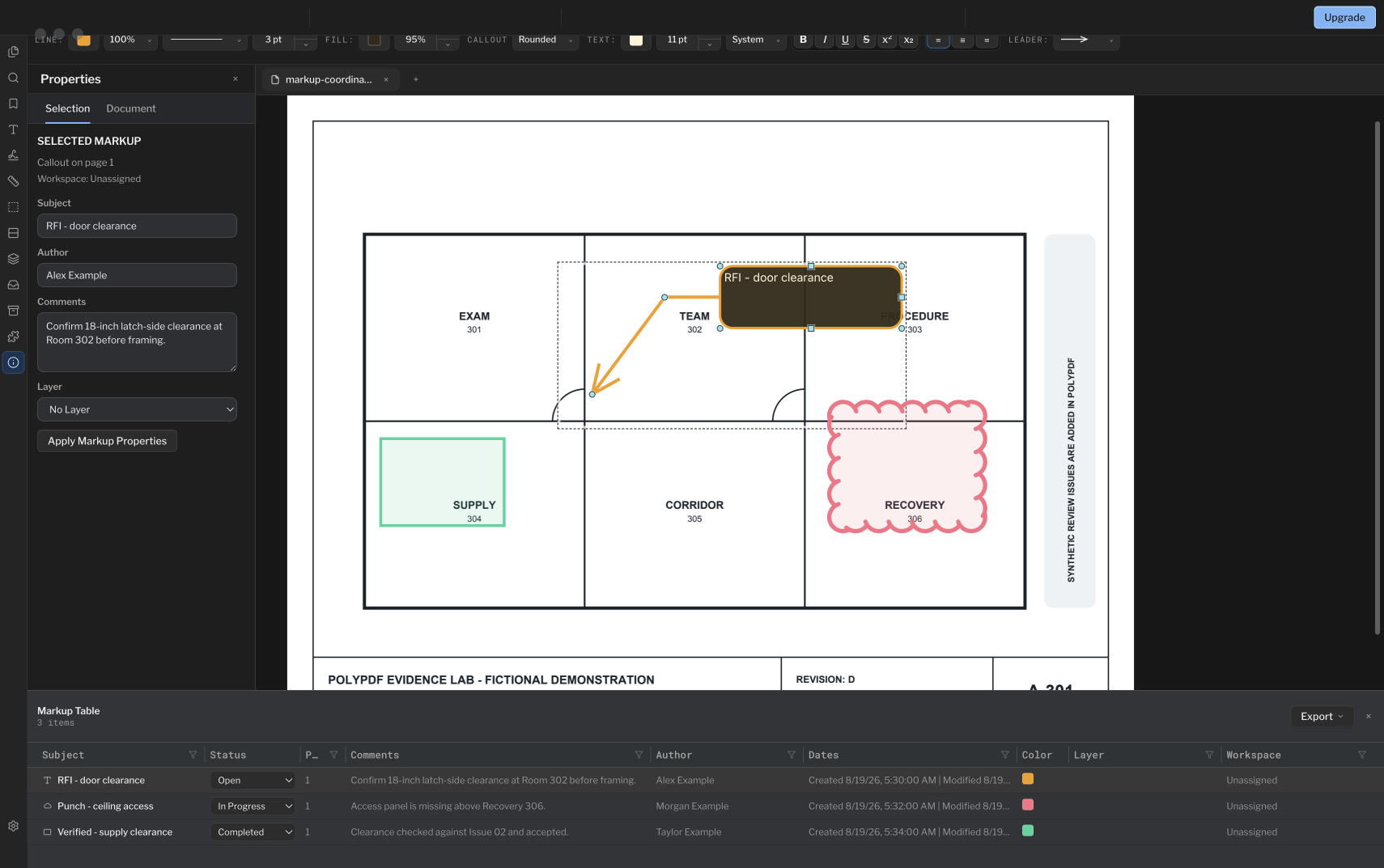
A cloud on a plan explains where an issue is. A disciplined markup row explains what it is, who must review it, and what can be handed to the system that owns the formal record.
- Release review
- Aligned with PolyPDF 1.5.4 (build 26) on . Earlier walkthroughs and screenshots retain their versions below.
- Walkthrough verified
- Tested with
- PolyPDF 1.5.0 (build 22); screenshot from 1.4.0 (build 17)
- Platforms
- macOS and Windows
Work with the construction drawing set
Review the Willow Creek coordination sheets
X101 · X102
- Open X101 and inspect the three numbered coordination issues and their existing sticky notes.
- Use X102 to match each location to its issue, trade, status, and requested response. Add your own review markup on a copy.
- Save the copy, reopen it, and inspect the annotations and any exported Markup Table before handing it off.
The source contains three authored issues and four PDF layers. These are fictional coordination exercises; no engineering or code-compliance conclusion is established.
Drawing reference values, not new app test results. Work on a copy and check your own saved output.
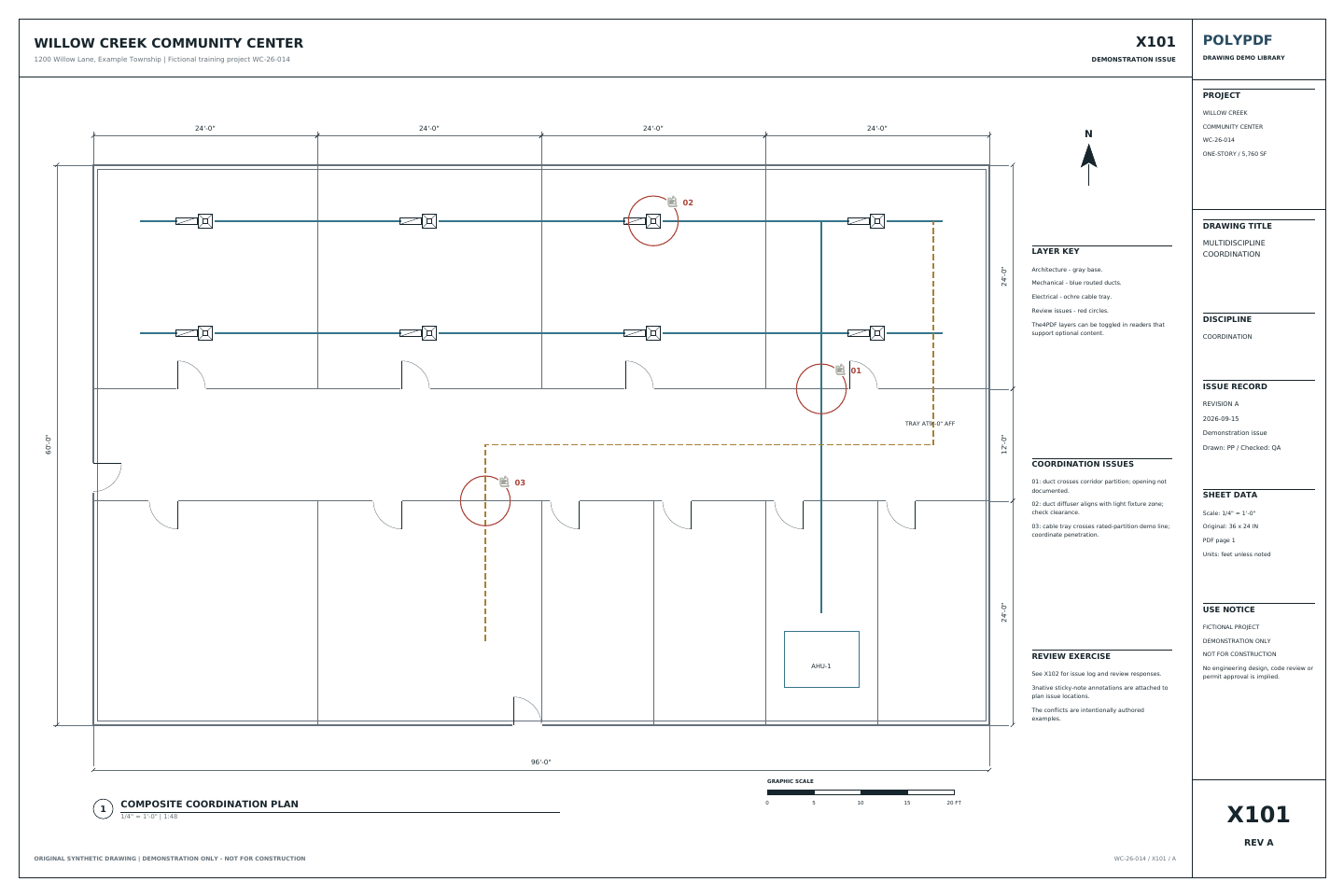 Download the example drawing · PDF
The exercise above uses the Willow Creek library. Earlier walkthrough screenshots and saved examples below retain their original drawings, versions, and quantities.
Highlight a review area without hiding its details
In PolyPDF 1.5.4, highlights blend with the drawing so text and linework remain readable. Select a filled annotation and use Highlight beside Fill in the style toolbar to turn the shape into a highlight. Add a callout or comment to record what the highlighted region needs.
Use a repeatable review stamp in 1.5.1
The interactive stamp builder lets you prepare a fixed review heading with prompted reviewer or status fields and an automatic date. Save the template to a toolset if you will reuse it, then complete the values for each placement. A stamp records visible review information; it does not replace the Markup Table discussion or a certificate signature.
Define what PolyPDF owns in the workflow
PolyPDF holds the marked-up drawing and a structured register of the markups on it. Rows carry subject, status, page, comments, author, dates, color, layer, workspace, and configured custom columns. Selecting a row reveals its page markup.
That is useful input to an RFI or punch-list process, but it is not the system of record. PolyPDF does not assign a formal RFI number from a project server, route the question to a design professional, attach an official response, or enforce contractual due dates. Those steps stay in the project platform or procedure your team has approved.
In the screenshot, the callout and row titled “RFI - door clearance” ask for confirmation of 18 inches of latch-side clearance at Room 302. Capturing the question on the drawing is the first step; issuing it as a numbered RFI still happens in your project system.
Choose a naming and status convention first
A register becomes searchable when subjects are predictable. Put the durable identifier and a short description in Subject, then use Comments for the complete question, observation, or acceptance note. Do not leave the only meaningful description inside a callout graphic.
| Use case | Subject pattern | Suggested status path |
|---|---|---|
| Design question | RFI-014 — Confirm ceiling grid height | Open > In Progress > Reviewed or Accepted |
| Punch item | PUNCH-107 — Seal wall penetration | Open > In Progress > Completed > Reviewed |
| Rejected proposal | ASI-006 — Door swing revision | Open > Rejected |
PolyPDF offers No Status, Open, In Progress, Completed, Accepted, Rejected, and Reviewed. Your project may define those words differently. Document the team's meaning before review begins; for example, Completed may mean the field work is reported complete, while Reviewed means someone independently checked it.
Build the issue register on the drawing
- Open the correct drawing revision and save a working copy if your document-control procedure requires one.
- Add a cloud, callout, text, shape, photo stamp, or other markup at the exact issue location. Keep one independently closeable issue per markup or logical group.
- Set a specific Subject. Put the requested decision, observed condition, dimension, or acceptance criterion in Comments.
- Open the Markup Table from the footer control, Window > Panels > Markup Table, or the sidebar context menu.
- Select a row to reveal its associated page markup. Use the Status control in the row to apply the agreed review state.
- Sort a column by its heading. Use the funnel controls on supported columns to keep only the values relevant to the current review.
- Review the visible rows against the page, choose a detailed export or summary, and verify the exported scope for the receiving workflow.
The table can also update comments and subjects inline. Multi-selection can support consistent bulk status changes, but scope those changes carefully: a convenient batch edit is not a substitute for verifying each location.
Filter for a focused review session
Use the table as a review window, not a second drawing. A superintendent might filter to one page or workspace, an architect might inspect a specific subject family, and a closeout reviewer might focus on rows whose current status still requires action. PolyPDF keeps the visible row connected to the page so the reviewer can inspect geometry and context before changing the state.
- Filter Page when the meeting is reviewing one sheet or area.
- Filter Subject or Comments for a known issue prefix, discipline, room, or tag.
- Filter Author, Layer, or Workspace when responsibility or drawing organization carries the scope.
- Sort Status to group the lifecycle states, then inspect every row before a bulk update.
- Clear filters before final reconciliation so an unresolved row is not omitted merely because it was hidden.
A filtered count is only the visible subset. Do not assume a detailed export contains hidden rows. Clear filters when the recipient needs the full register; otherwise record the active filters and compare exported rows or summary counts with the intended scope.
Export what the receiving process needs
The Markup Table export menu offers detailed CSV, summary CSV, summary PDF, JSON, and copied text. Detailed rows include the built-in fields shown in the table and configured custom-column values. The summary formats aggregate the visible scope, which is useful for a meeting record or progress snapshot.
| Output | Good fit | Important check |
|---|---|---|
| Detailed CSV | Import, spreadsheet reconciliation, or a formal register | Clear filters for a full register; verify the exported row count. |
| Summary CSV | Counts by status, page, subject, workspace, or custom value | It summarizes the current visible scope. |
| Summary PDF | Human-readable review attachment | Inspect the rendered pages before issue. |
| JSON or copied text | Structured handoff or quick communication | The receiving system still owns validation and record creation. |
Attach the reviewed PDF or summary to the formal RFI or punch record according to project procedure. If the official platform assigns a different identifier, update the PolyPDF subject or maintain an explicit cross-reference rather than allowing two numbering systems to drift.
Closeout checks before you hand the register over
- Verify the PDF file name, revision, and sheet identity before adding or closing issues.
- Require a comment that explains why a status changed when the change is not self-evident.
- Distinguish reported completion from independent review in the team's status rules.
- Reopen the saved PDF and inspect representative rows, page links, comments, and appearances.
- Export after filters are intentionally set, and label the export with its scope and date.
- Keep the authoritative RFI, punch, response, approval, and due-date history in the designated project system.
This separation makes the workflow stronger: PolyPDF remains the direct visual review record, while the project system remains the place where contractual communication and closure are controlled.
Frequently asked questions
Does PolyPDF create a formal RFI?
No. It can label a markup, store comments and status, and export the review data. A formal RFI number, routing, response, due date, and issue history belong in your approved project system.
Do Markup Table filters apply to every export?
Do not assume an export includes hidden rows. Clear filters for a full register. If you need a focused report, record the filters and compare exported rows or summary counts against the visible and total markup counts before distribution.
Which markup statuses are available?
No Status, Open, In Progress, Completed, Accepted, Rejected, and Reviewed. Define what each state means for your team before using them as a controlled process.
Can I export PDF comments to CSV?
Yes. PolyPDF can export detailed markup rows as CSV, including subject, status, page, comments, author, dates, color, layer, workspace, and configured custom columns.
Sources and further reading
- PolyPDF 1.5.0 (build 22) Markups List implementation and in-app guidance — Covers the row fields, status vocabulary, filtering, selection, and export formats described above.
- The sample clinic coordination sheet shown in this guide — Three markups in the Markup Table with comments and the Open, In Progress, and Completed statuses.
Turn drawing comments into a reviewable register
Download PolyPDF for macOS or Windows, mark up a working copy, and open the Markup Table to review the resulting rows. Keep formal RFI and punch records in the system your project designates.
Free with no trial timer: markup, review, calibration, 3 hand-created measurements per document, and Revision Package viewing. Symbol Search, plugins, and Revision Package changes or publishing require Pro.