PDF takeoff for Mac and Windows
Turn scaled PDF drawings into an organized takeoff worksheet.
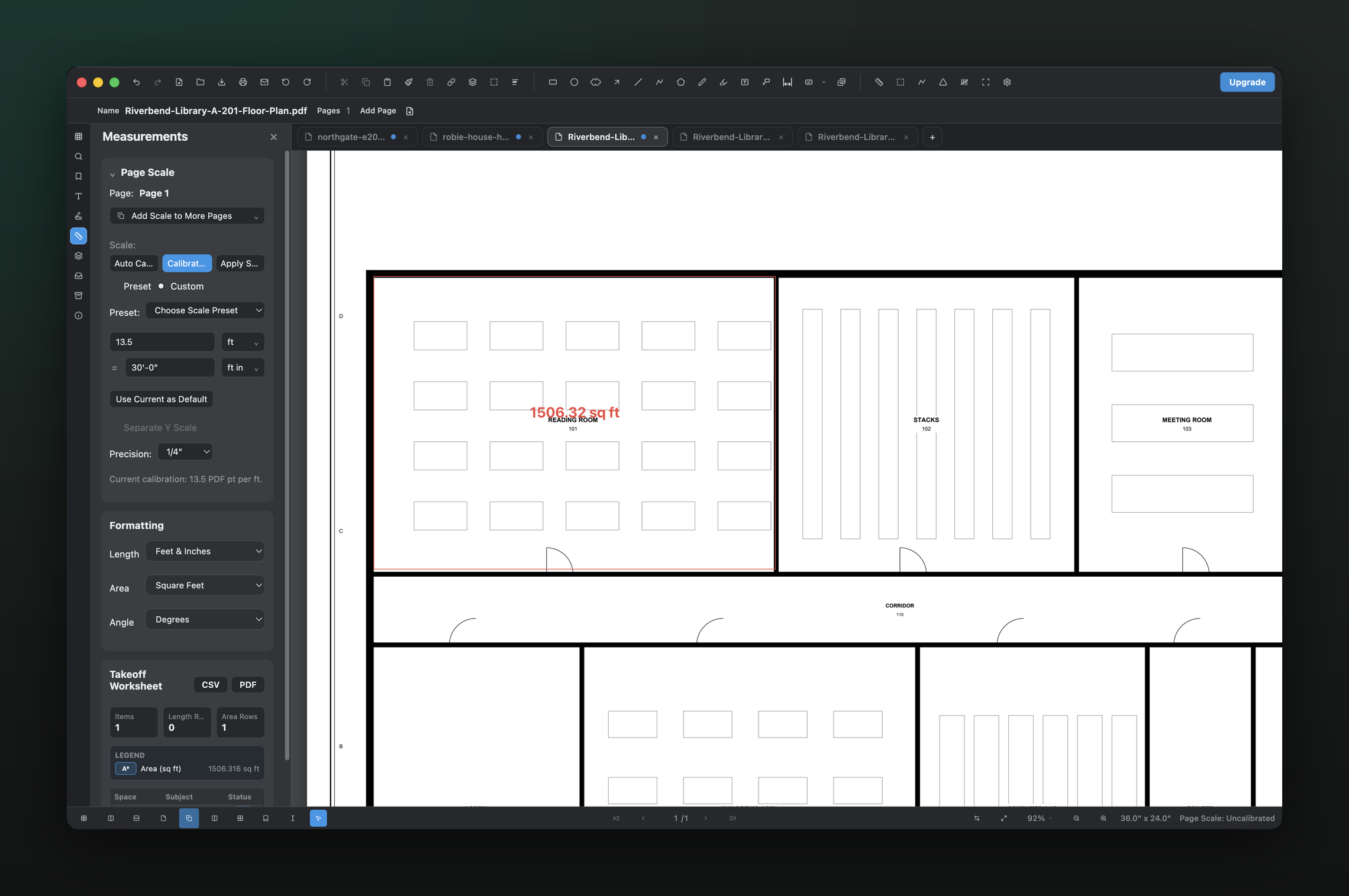
Calibrate a sheet once, measure lengths, areas, perimeters, angles, and counts, then keep the results beside the drawing and export them to CSV or PDF.
Built for estimators and contractors who receive PDFs—not perfect CAD files—and need a direct path from drawing to quantity record.
01 / WHY
Keep the quantity and its drawing context together.
A takeoff is easier to audit when every result still points back to the sheet it came from. PolyPDF places measurements on the drawing while the worksheet tracks subject, quantity, units, and totals in one desktop workspace.
02 / WORKFLOW
From source PDF to a result you can review.
- 01
Confirm the page scale
Choose a common architectural or engineering preset, or calibrate against a known distance. Use imperial or metric units to match the source sheet.
- 02
Create measurement subjects
Organize results by the material, assembly, or scope you are quantifying so repeated measurements land in a consistent worksheet row.
- 03
Measure and count on the sheet
Place distance, area, perimeter, angle, and count annotations directly on the drawing while PolyPDF updates the worksheet.
- 04
Export for pricing or review
Send the worksheet to CSV for estimating calculations or PDF for a readable project record.
03 / WATCH
Watch a calibrated measurement move into the takeoff worksheet.
See scale calibration, quantity placement, worksheet organization, and export in the current PolyPDF interface.
Both versions use current PolyPDF product captures. Captions are available in the player.
04 / FIT
Useful takeoff fundamentals without a recurring seat fee.
- Works with ordinary PDF plan sets from designers, owners, and general contractors.
- Supports architectural and engineering scale calibration in imperial or metric units.
- Keeps measurements visible on the sheet and organized in the takeoff worksheet.
- Exports results without requiring a CAD source file.
- Lets you verify the workflow free before unlocking unlimited hand-created measurements.
Try the full workflow free. Pay only to remove the hand-created measurement cap.
Use PolyPDF 1.x forever on up to 3 Mac or Windows computers. Every PolyPDF 1.x update is included. Future major versions may be optional paid upgrades.
Founder pricing is available until September 10, 2026 at 11:59 p.m. ET or after 100 fulfilled licenses, whichever comes first.
05 / FAQ
Questions before you test it.
What measurements can PolyPDF create?
PolyPDF supports distance, area, perimeter, angle, dimension, and count workflows on calibrated PDF drawings.
Can I export takeoff results?
Yes. The takeoff worksheet can be exported to CSV for downstream calculations or PDF for a readable record.
Do I need the original CAD file?
No. PolyPDF works from the PDF drawing. You calibrate the page using its stated scale or a known distance.