Construction drawing review
Mark up construction PDFs so every comment stays tied to the sheet.
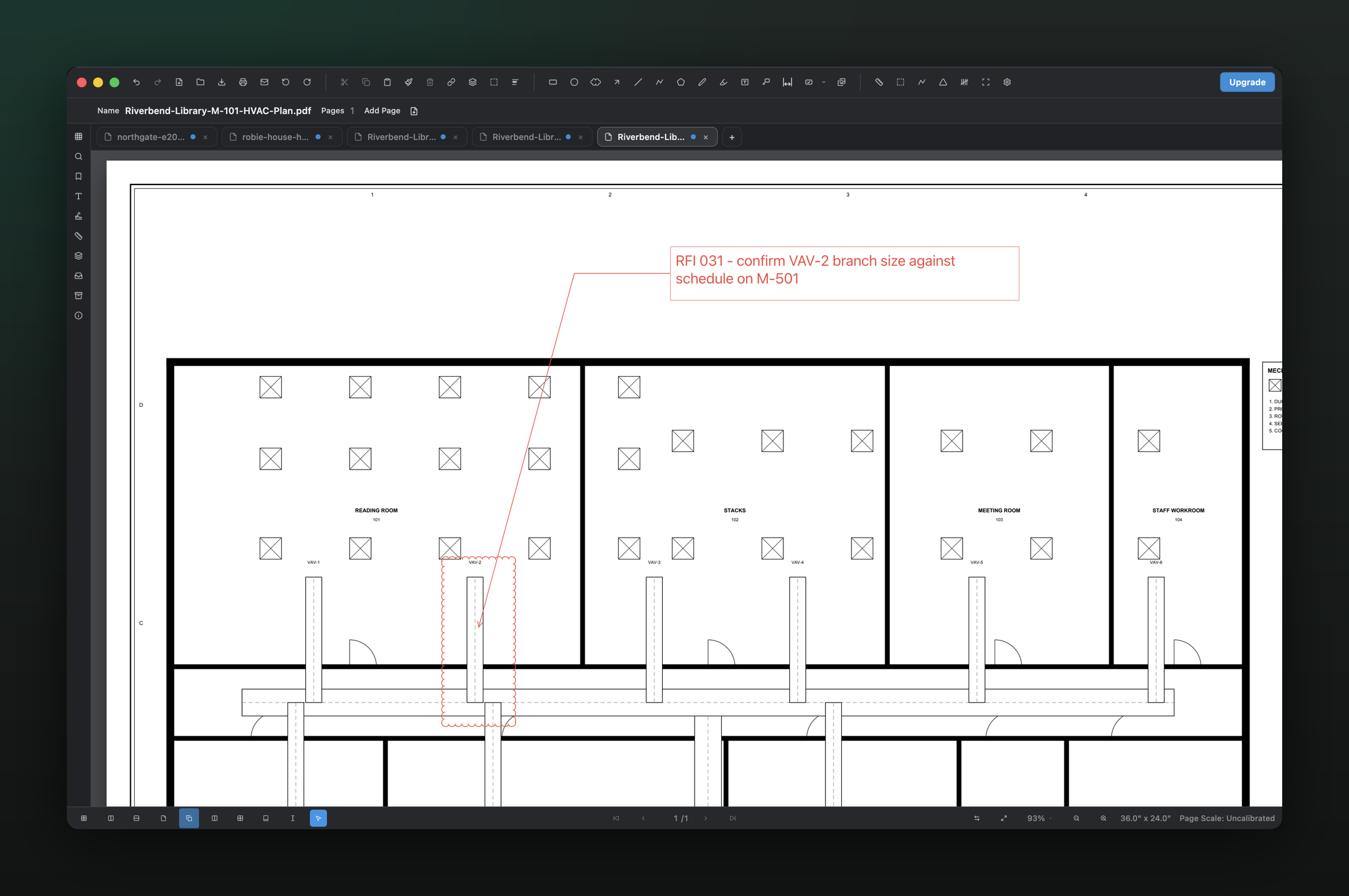
Add callouts, text, highlights, shapes, stamps, and revision clouds directly to plan sets, then use the Markups list to track what has been flagged.
A local desktop workflow for design review, RFIs, field observations, punch notes, and drawing handoff on Mac or Windows.
01 / WHY
A useful markup should survive the handoff.
Construction comments lose value when the recipient cannot tell which part of the drawing they describe. PolyPDF keeps each annotation on the page and lists it in the sidebar, so reviewers can scan the record and jump back to the visual context.
02 / WORKFLOW
From source PDF to a result you can review.
- 01
Open the issued drawing set
Review the same PDF sheets your team already distributes instead of converting the project into another proprietary format.
- 02
Place the comment where it belongs
Use a leader callout for a specific condition, a revision cloud for an affected region, or text, shapes, highlights, and stamps for the rest.
- 03
Check the Markups list
Use the sidebar record to see annotations together and reduce the chance that a note disappears in a visually dense plan.
- 04
Save or export the reviewed PDF
Create a marked drawing that can be sent through the project’s existing document-control process.
03 / WATCH
Watch drawing comparison turn into a marked review.
See revision differences inspected and carried into a cloud-and-callout review workflow.
Both versions use current PolyPDF product captures. Captions are available in the player.
04 / FIT
Review tools built around the drawing, not a chat thread.
- Callouts connect a readable note to an exact point on the sheet.
- Revision clouds make changed or questioned regions visible at a glance.
- Text sizing can be adjusted for on-screen and printed readability.
- The Markups list keeps annotations discoverable across a busy page.
- Measurement tools remain available when a review question also needs a quantity.
Try the full workflow free. Pay only to remove the hand-created measurement cap.
Use PolyPDF 1.x forever on up to 3 Mac or Windows computers. Every PolyPDF 1.x update is included. Future major versions may be optional paid upgrades.
Founder pricing is available until September 10, 2026 at 11:59 p.m. ET or after 100 fulfilled licenses, whichever comes first.
05 / FAQ
Questions before you test it.
What construction markups does PolyPDF support?
The current app includes text, callouts, highlights, shapes, freehand drawing, stamps, revision clouds, and measurement annotations.
Can I use PolyPDF for RFIs or punch notes?
You can place RFI and punch-related comments directly on the relevant sheet and save the marked PDF. PolyPDF is the drawing workspace; your project’s formal routing and approval process can remain unchanged.
Can recipients read the marked PDF without PolyPDF?
PolyPDF can save and export PDF output for normal document handoff. As with any PDF workflow, verify the exported file in the recipient’s viewer when interoperability is critical.